CREOpsDesk
Beta — First ClientA Django-based platform for CRE marketing coordinators — manages commercial real estate listings across five platforms through an optimized manual-transfer workflow, with an n8n + Puppeteer browser-automation pipeline prototyped for platforms that allow it.
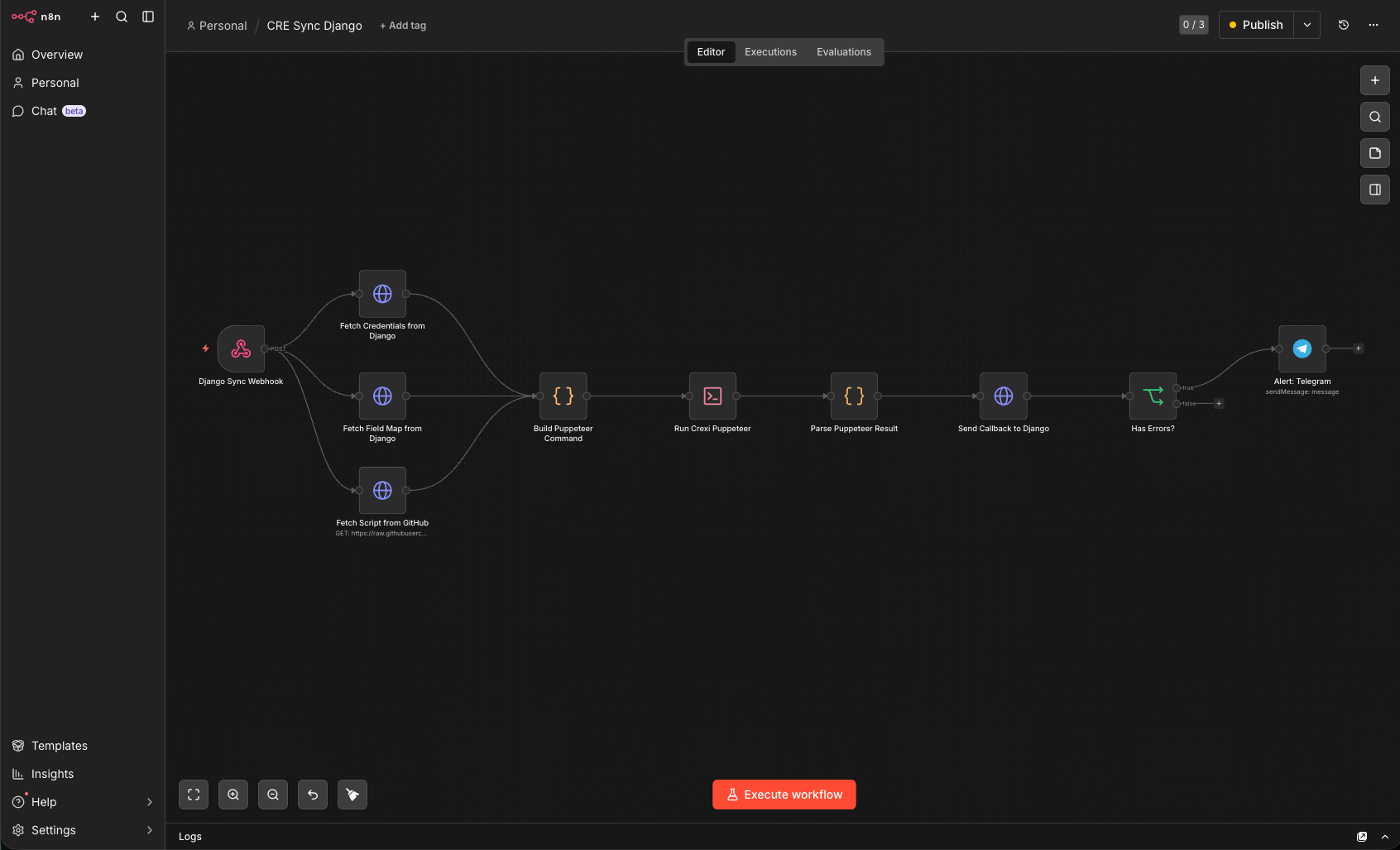
The n8n workflow I built for the browser-automation prototype (since disabled — see below)
The Problem
The client is a commercial real estate brokerage. The platform, CREOpsDesk, is hosted at creopsdesk.com. They list properties on multiple platforms simultaneously — CoStar, LoopNet, Crexi, Catylist (Moody's CRE), and their own website. Each platform has its own UI, its own field names, its own quirks. Keeping listings in sync across five platforms was eating hours of manual data entry every week, with inevitable inconsistencies.
The broker needed one place to manage all listings and have changes flow to every platform — whether through automation, or through a highly efficient manual process for platforms that contractually prohibit it.
My Role
I designed the full system architecture and built every component: the Django web app, the optimized manual-transfer workflow, the n8n + Puppeteer browser-automation prototype, and the deployment infrastructure. This is my first client for a new AI automation consulting practice — I built it for free during beta to prove the value. The work is end-to-end mine.
The Approach
The project started as a rapid prototype on Google Sheets + Google Apps Script to validate the concept quickly. When multi-tenant requirements and UX needs emerged, I moved everything to Django. The Google prototype is deprecated — all functionality now lives in the Django app.
The system has three layers:
Layer 1 — Django Application: The central hub. Manages listings, field maps, and platform configurations. Each CRE platform has a canonical JSON field map that serves as the single source of truth — defining field names, DOM selectors, input types, section structure, and how they map to the internal data model. The same field map drives both automated sync and the manual transfer workflow.
Layer 2 — n8n Browser-Automation Prototype (disabled): I built an n8n workflow that ran Puppeteer-based browser automation to sync listings on platforms that allow it. I have since disabled it: running Puppeteer / browser automation on n8n violates n8n's Terms of Service, so it is not a path I will ship on. The other n8n workflows (content generation, social scheduling, client reports) were scaffolded but never went live.
Layer 3 — Browser Automation + Manual Transfer: Two paths to get data onto platforms:
- Automated (Puppeteer — prototype, now disabled): Puppeteer scripts handled data entry inside n8n Code nodes using a thin-loader architecture — each node fetched the real script from a shared GitHub repo at runtime, cached it, and fell back to cache on failure. I disabled this path because running browser automation on n8n violates n8n's ToS; the thin-loader pattern itself carried into other work.
- Manual Transfer (for CoStar and others that block automation contractually): A highly optimized split-screen copy-paste workflow. The Django app displays the listing data on one side, the platform is open on the other. An auto-generated checklist tracks each field as it's transferred, with audit logging for accountability and completion tracking. This isn't a fallback — it's a first-class workflow designed for speed and accuracy when automation isn't an option.
What I Built
- Django listing management app — multi-tenant architecture, canonical JSON field maps as single source of truth, rollup computations, SpeedPy UI design system
- Manual transfer workflow — split-screen copy-paste with auto-generated checklists, field-by-field tracking, audit logging, completion status
- n8n + Puppeteer browser-automation prototype — thin-loader architecture (runtime code-fetching from GitHub, caching, version pinning, 5-tier error taxonomy); since disabled because Puppeteer-on-n8n violates n8n's ToS
- Scaffolded n8n workflows — content generation, social scheduling, client reports (shells, never went live)
- n8n deployment infrastructure —
provision.pyspins up isolated n8n instances per client with PostgreSQL in ~2 minutes - n8n Workflow SDK usage — programmatic workflow authoring for the queue + webhook variant
The Result
The system is in beta with my first client. Listings are managed in one Django interface and reach the platforms through the optimized manual-transfer workflow, which turns what was a tedious, error-prone process into a fast, auditable one. (The n8n/Puppeteer browser-automation path was prototyped but disabled because it violates n8n's ToS.)
The thin-loader architecture, built for that browser-automation prototype, let a broken selector be fixed once for every client instance without redeployment. The provisioning script means onboarding a new client is a 2-minute automated process instead of 30–45 minutes of manual setup.
This is the first engagement for a new AI automation consulting practice. I'm building it for free to prove the value — the bet is that demonstrating real ROI earns a long-term paid relationship and referrals to other brokerages.
Tech Stack
- Backend: Django 6.0.3, PostgreSQL, Celery, Redis
- Frontend: Tailwind CSS, Alpine.js (SpeedPy UI design system)
- Orchestration: n8n (self-hosted on Appliku), n8n Workflow SDK
- Browser Automation: Puppeteer (thin-loader architecture via n8n Code nodes)
- Infrastructure: Docker, Appliku, GitHub (script hosting)
- Integrations: CoStar, Crexi, Catylist, LoopNet
- AI: LLM content generation for listing descriptions and social posts